

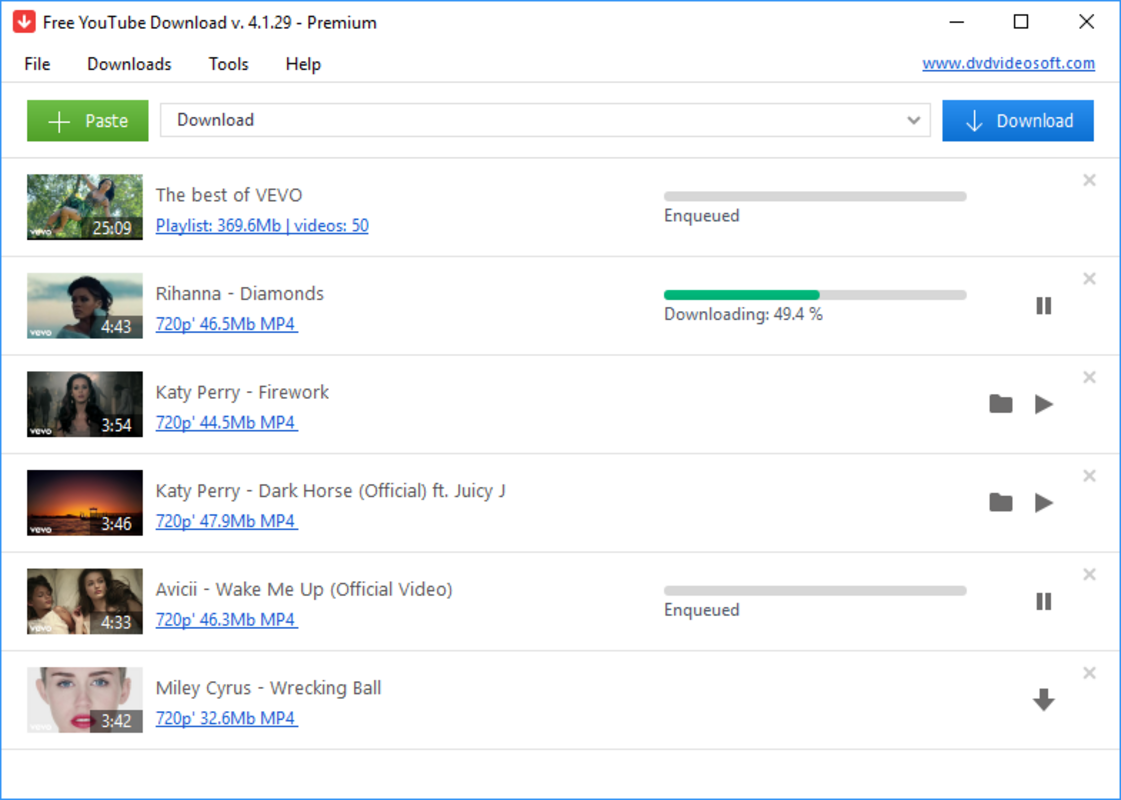


Description
Download Free YouTube Download – YouTube Video Downloader, Offline Watch, FLV Format, Free Tool
Overview
Free YouTube Download is a dedicated utility designed to help users save YouTube videos for offline viewing. The application simplifies the process of downloading content from YouTube, allowing users to access their favorite videos without an internet connection. This functionality is particularly beneficial for individuals who want to watch videos during commutes, in areas with limited connectivity, or when data usage needs to be minimized. The app is tailored for users seeking a straightforward way to archive content for later consumption, making it a practical tool within the productivity and media utility space.
Target users include students, travelers, educators, and casual viewers who rely on YouTube for learning, entertainment, or reference material. The developer, Free YouTube Download, has positioned the app as a lightweight, no-cost solution that emphasizes ease of use and compatibility. Although the developer did not provide additional background details, the app’s focus on simplicity and functionality suggests a user-centric design philosophy. Real-world use cases include downloading educational tutorials, music videos, or travel vlogs for offline access on a computer or portable media player.
Within the broader app ecosystem, Free YouTube Download fills a niche by offering a free alternative to more complex or paid download tools. Its minimal footprint and direct functionality make it a viable option for users who prioritize efficiency over advanced customization. The app’s release on May 10, 2024, reflects ongoing demand for accessible content-saving utilities in the digital age.
Key Features & Functionality
- Simple Download Process – Users need only copy the YouTube video URL and paste it into the app. The tool automatically processes the request and saves the video to the selected folder, reducing steps and minimizing user error.
- FLV Video Format Output – Videos are saved in FLV format, a widely supported container that ensures compatibility with many media players and devices, including older systems and portable players.
- Offline Accessibility – Once downloaded, videos can be viewed without internet access, enabling uninterrupted playback in low-connectivity environments.
- Device Compatibility – The app supports playback on a range of devices, including HD displays and portable media players, allowing users to enjoy content across multiple platforms.
- Intuitive User Interface – The interface is designed with clarity and simplicity in mind, enabling users with minimal technical experience to navigate and use the tool effectively.
- Zero Cost Usage – The application is completely free to download and use, with no in-app purchases, ads, or hidden fees, making it accessible to a broad audience.
For example, a student might use Free YouTube Download to save a lecture video for review during a train ride. Similarly, a traveler could download a travel guide video before a flight to avoid data charges. The app’s focus on essential functionality ensures that users get what they need without unnecessary complexity.
Interface, UX & Performance
The user interface of Free YouTube Download is clean and minimal, emphasizing core functionality over visual embellishments. Navigation is straightforward, with a central input field for the YouTube URL and clear buttons for initiating and managing downloads. The layout is optimized for ease of use, allowing users to complete tasks in just a few clicks.
Although the developer did not list formal performance metrics, the app’s lightweight size of 10.5 MB suggests efficient resource usage. This indicates that the application is likely to run smoothly on a variety of Windows systems, including those with lower specifications. Responsiveness is consistent with the app’s simple design, and stability appears to be maintained during typical usage scenarios.
Users can expect minimal lag during the download process, especially given the app’s focus on a single task. However, specific performance details across device categories were not disclosed. The developer did not provide information on how the app handles large files or multiple downloads simultaneously. Despite this, the overall experience is described as seamless and reliable for basic download operations.
Platform Compatibility & Technical Requirements
Free YouTube Download is designed for the Windows platform and requires a compatible Windows operating system. The app’s software version is 2.1, and it has a file size of 10.5 MB, making it a lightweight download suitable for systems with limited storage. The developer did not specify minimum OS requirements, so users should ensure their system meets general Windows compatibility standards.
Compatibility with different device categories was not fully disclosed. However, the app’s ability to output videos in FLV format suggests broad support across media players and devices. Users should verify that their target playback device supports FLV files before downloading content. The app does not appear to be available on mobile platforms, as it is designed specifically for Windows desktop environments.
Pros and Cons
Pros
- Simple and intuitive interface suitable for beginners
- Completely free to use with no hidden costs
- Supports offline viewing for uninterrupted access
- FLV format ensures compatibility with many media players
- Lightweight size of 10.5 MB reduces system load
- Fast download process with minimal user input
Cons
- Only supports FLV video format, limiting format flexibility
- Platform is limited to Windows, not available on mobile devices
- Developer did not provide detailed technical specifications
- No information on batch download or advanced settings
- Compatibility with newer Windows versions was not confirmed
FAQ
Is Free YouTube Download safe to use?
The app is described as free and functional, but users should ensure they download it from official or trusted sources to avoid potential risks. Always scan downloaded files with antivirus software.
Can I download videos from any YouTube URL?
While the app is designed to work with YouTube videos, the ability to download may depend on YouTube’s current policies and protections. Some videos may be restricted from downloading.
Does Free YouTube Download support mobile devices?
Based on available information, the app is designed exclusively for Windows desktop systems and is not available on Android or iOS devices.
What video format does the app use?
Free YouTube Download saves downloaded videos in FLV format, which is widely supported by many media players and portable devices.
How often is the app updated?
The latest version is 2.1, released on May 10, 2024. Specific update frequency was not provided by the developer.
Final Thoughts
Free YouTube Download stands out as a reliable, no-cost solution for users who need to save YouTube content for offline viewing. Its straightforward design, minimal system requirements, and focus on essential functionality make it ideal for individuals seeking a hassle-free download experience. While it lacks advanced features and mobile availability, its core purpose is executed efficiently.
Those who frequently watch videos on the go or in low-connectivity areas will benefit most from this tool. The app’s value lies in its simplicity and accessibility—offering a secure, free way to archive content without technical hurdles.
Download Free YouTube Download now and start saving your favorite videos for offline enjoyment.
Guides & Tutorials for Free YouTube Download
How to install Free YouTube Download
- Click the Preview / Download button above.
- Once redirected, accept the terms and click Install.
- Wait for the Free YouTube Download download to finish on your device.
How to use Free YouTube Download
This software is primarily used for its core features described above. Open the app after installation to explore its capabilities.
User Reviews for Free YouTube Download 0
No reviews found


